So, I’ve made my decision and chose one of the five trackers I wrote about in my previous post. As I wrote there, all those trackers are good trackers and will get the standard fitness tracker job done. The only reason to go for a more expensive tracker is to have more functions or because you like the design better.
And I chose to go with…
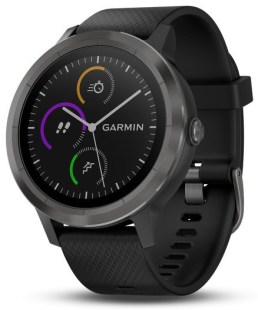
Garmin Vivoactive 3
The Garmin ended up being my choice of watch this time, for a few different reasons.
It looks like a watch. I didn’t want to have a square piece of plastic on my arm screaming tracker. I wanted something that could disguise itself like a watch and it does a pretty good job of it.
It gave me what I needed, and more. It tracks steps, heart rate and sleep. Which was the three most important things I looked for, which of course all of them does. But it also tracks all the sports I will probably try my hands on, both outdoors and indoors. It also has a built in GPS, so you don’t have to rely on your phone for that.
It also does a decent job as a smart watch in that it gives me notifications from the apps I choose. I can’t reply to them from the watch, but I can at a glance see if the event is something I need to see to right away or if it can wait. It can control music on my phone, start, stop, pause. I can also answer a phone call on the watch. This means that on trips I can mostly just tuck my phone away, control most of the features I need from the watch and listen to music and conversations via a headset.
I already have other Garmin hardware. I already have an Edge 820 cycle computer from Garmin. This means I’m already in their ecosystem, which I think works pretty OK. It doesn’t really matter though, since all apps talk to each other.
The only thing I might lack is the social interactions with other FitBit-users. But that’s nothing I really miss, as my only competitor now is myself. I want to become a better me, and for that I don’t need to know that I took fewer steps than my colleagues. Garmin has some challenges on it’s site, so you can get this with Garmin also if you really want it.
So my money went to the Garmin Vivoactive 3 this time.
I am planning to update some stats at least once a month maybe weekly, but as of right now the data is somewhat lacking. One of the few things I measure now is my weight and usually on Sunday mornings right after I wake up. When I get some more equipment I will get more and better data, but at least this is a start.
Equipment
What equipment I have now:
A body scale
A measuring tape
What equipment I need:
A better kitchen scale
For now, I just ballpark my food and that’s not good enough for real progress
A fitness tracker
For measuring those all important steps, calories burned, resting heart rate etc
When I get the last two pieces of hardware I can get more background info on some vital stats like sleep patterns, amount of sleep, better control over how much I eat etc.
So as you can see I am currently obese, something I’ve been for a long, long time. But my weight has been pretty stable around 102-104 kilos in the last weeks, so I’m happy I’ve managed to stabilize it after my illness. Often you gain the weight, and more, back but I am pretty happy that hasn’t happened yet. And I won’t allow it to happen anyway!
Analysis and goals
My weight has gone up from 104,5kg last week, but I’m not worried about that as it’s more or less inside the natural variations.
My first weight goal is 99kg. That will be me breaking the 100kg barrier for the first time in many, many years. And since it’s now so close I feel it is more in reach than ever before.
BMI is at 34. I won’t really say too much about this as it’s dependant on a lot of stuff that can skew it. I have a goal of getting it below 30 though, so unless I start to gain a lot of muscles that is still a goal.
I don’t really know if I can trust the fat percentage my weight is giving me. Yesterday it was 31.7% at the same weight, so… But as a man, I should be under 25% so my goal is first to stabilize it at under 30% and then move closer to 25% after that. Gaining more muscle should help with this.
My waist is now at 116cm. Quite a bit over the 100cm my doctor wants it to be. So again I don’t go for the end goal at once since that is far away. My goal is first to get it stable under 110cm and then I’ll set a new goal when that is reached.
Final thoughts
I know why I haven’t dropped weight the last week and it simply comes down to two reasons:
Too little sleep
The wrong snacks in my cupboard
Sleep
I can’t give you exact numbers but I’m pretty sure that my average this week is less than 7 hours, maybe closer to 6. That is too little when trying to lose weight. One of the reasons I lost weight while I was ill was because I got enough sleep. So need to get that number up again.
Next week will be hell to do that though as I need to get up at around 4am to get to the early shift at work. Problem is that I also have some things I need to do in the evenings next week, so getting to bed at 9pm will be difficult. But I’ll give my best shot. And since the 17th is our national holiday I can regain some lost sleep on Thursday.
The wrong snacks
Last week my cupboard was lacking one food group and had too much of another one. I didn’t have any fruit in there, but I did have loads of candy. That is NOT a good thing when trying to lose the pounds.
But now I’ve bought myself some apples so my “problem” is now solved. I really don’t crave chocolate the same way I did before and I’ve gotten a renewed hunger for fruit, so it shouldn’t be a problem eating more healthy snacks again.
You might now say “Hey Frank, but the fruit is also full of sugars.” And yes, it is, but much less than candy, so you eat less because you get full earlier. And, for me at least, it takes longer to eat. I could finish a HUGE chocolate in not many minutes, but an apple takes me a while longer to eat. Fruit also contains much more fiber, vitamins etc that candy doesn’t. So even if it contains sugar, it’s just so much better for you.
And my “secret” to get an apple to last long is to cut it into pieces before you eat it and not eat it in it’s natural “apple shape.” 🙂 If I have a whole apple and start to eat it, it won’t take long to finish, maybe a couple of minutes, because who wants to walk around with a half-eaten apple for several minutes.
If you cut it into pieces and put it into a bowl it will usually last much longer. I will take a piece now and then and one or two apples could last me an hour. And when I’m done, I’m usually not hungry for anything anymore and the chocolate will safely rest in the cupboard. And if you don’t like that the fruit gets a little brown when lying in the bowl you can just squeeze some lemon juice on it. That prevents the browning.
So, we are now entering a new section and we are Getting Started. Yeah, that’s the title of the section, so I must believe that we are now finally going to write some code.
Lecture 25: Section Overview
This is just a section overview, just as the title say. Nothing special, let’s continue.
Lecture 26: An Overview of the CodeLite Interface
This is a very nice video as it tells you how you can change the layout of the CodeLite IDE to your own personal preference.
I personally didn’t change it up to much. Just removed a few tabs the Workspace view I don’t think I will be using for now and also moving it to the right side of the window. That way it looks a little bit more like my setup in Visual Studio 2017. I also fiddled around with the themes to find one to my liking and ended up using Tomorrow Night as my theme.
Lecture 27: Writing our first program
We write a small program to type a message to the user and get an answer from him. We started with the template we made earlier, but deleted the source and wrote everything from scratch. This is a nice educational move as it will teach you more about the structure of a C++ program when you have to write everything yourself instead of starting from a random template.
We learn some basic input/output functions of C++ and the difference between the insertion and the extraction operator. There is a small mention of namespaces, variables and how we include libraries.
We end up with a short little program that we compile and hopefully end up with zero errors and warnings. I managed to bork it with some missing colons, but happily nothing I didn’t know how to fix.
The instructor also shows us that since we made our own template and based this project on that, we can see that CodeLite instructs the compiler to use the C++14 standard.
So again nothing special, but this is Beginning C++ after all and we all have to start somewhere.
Lecture 28: Building our first program
We learn more about compiling and building a project. What are source-files, object-files and executable files? The instructor also goes through the different options CodeLite have for compiling, building, rebuilding and cleaning files and projects.
The course also tells us more about the difference of the files we see in the Workspace and what is really on the disk. There are many files on the disk that we as developers don’t need to know about, at least not at this moment, but it’s nice that the course explains them anyway.
For beginners in C++ this is maybe not fully understood right now, but it’s something you need to know when your projects gets bigger and more advanced. But we’re still in the introduction stage learning basics that are important to know to set up your workflow and understand what’s happening if something goes wrong.
Lectures 29-33: What are different types of errors?
These videos goes through the following types of errors:
Compiler errors
The instructor creates a new project and shows us some common compiler errors and some ways on how to fix them.
Compiler warnings
What’s the difference between a warning and an error? Well, here you get an explanation. In short, it’s not “real” errors in your program, but it warns you about things that might give you unwanted or unexpected results.
Seems like g++ is fairly good at giving error messages and warnings that you can understand. And CodeLite also helps you find the error as if you click on an error message, the IDE will jump to the place in the code where the error is reported.
Linker errors
These errors are a little bit more tricky to find. A program might compile without warnings, but when you build it you might get a linker warning. These errors can be more tricky to find in your source.
This is something we probably won’t be having much in this course since we’re doing all the coding ourselves, but when you create large projects and try to link other libraries etc this is something that can happen.
Runtime errors
Runtime errors are errors that happen when you’ve taken care of all the bugs in your program, compiled and built it and made the executable file. Then some user runs your finished program and gets an error and yells at you, even after all your hard work.
These are errors that you can’t really avoid. Sometimes a user gives you strange inputs, a file can be missing or something like that.
These errors can make your program crash, so you have to use Exception Handling to deal with them. Exception handling will be a topic for later in the course.
Logic errors
Logic errors are errors that the compiler won’t help you with and doesn’t stop you from building your program. These errors are made by the programmer during writing of the code.
These errors can really only be found by doing thorough testing of the program before you send it to end users.
Lecture 34: Section challenge
Fairly easy challenge here as everything you need has been shown to you in the previous videos.
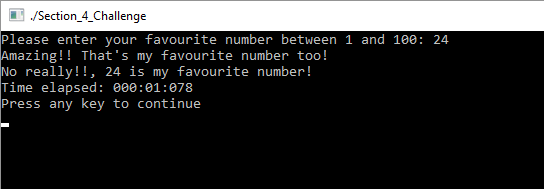
What you need to do is to make a program that asks the users for his favourite number and get that from him. You will then say that it’s also your favourite number and confirm that the number the user typed really is your favourite number.
This is the output of my solution to the challenge
If you want to see my solution you can check out this gist. You shouldn’t really need to look at my solution to solve this challenge, but it’s there if you need it.
Lecture 35: Section Challenge – Solution
Well, not surprisingly the solution the instructor shows us are more or less identical to my solution.
Quiz 1: Section 4 Quiz
The section ends with a quiz with 10 questions relating to the topics covered. Shouldn’t be too hard, but it’s nice to get a review of the topics to see if you understood the material.
What is important is seldom urgent and what is urgent is seldom important.
– Dwight D. Eisenhower
The course is designed to get you better at scheduling and managing your tasks using a method called the Eisenhower Decision Matrix. It’s a fairly short course, so I went through all of it in an evening. And these are my thoughts about it.
This course is a hard one to rate fairly for a couple of reasons.
It’s short. But does short mean something is bad or of no value? Of course not, sometimes a 10 second pep talk can be all you need to get something done.
The material is very well known. Search on Google for “Eisenhower Decision Matrix” and you get 148 thousand hits.
But I’ll make this article pretty short also and say that I’m a little “meh…” about this course.
First reason for that is the cost. They want $49.99 for it, which is WAY to much. I got it on a sale for $10, which I think is the maximum I would pay for this course.
Second, but more importantly is the content of the course. They explain every part of the matrix and how to use it, but I feel that they could have done a better job of giving real life examples of the topics.
There is a video in there which is labeled “Personal Example”, and I’m sure it IS a fairly real example from the instructor. But all he ends up with is to repeat what has already been said on the previous videos.
There is one thing the course does better than that article and that is it’s methodology of HOW you define which of your tasks goes where. In short how they do it is:
List all your tasks
Rank them first by Urgent or Not Urgent
Rank each block into Important or Not Important
And one HUGE point about that 3rd step is that you rank them on the importance FOR YOU! Does the task help you further your goals or is it a task that help some other peoples goals? Only tasks important to you should go in the Important category.
So to sum up, will I recommend the course? If you can get it for cheap, then feel free to do so if you feel you need more than the article I linked above.
If you do some more Googling about the topic and think that is better use of your time, then give this course a pass. If you have some more questions about the topic, then drop a comment below and I will answer to the best of my ability.
In my quest for better health and since I am a nerd/geek/whatever I need to have the numbers, the stats, the data so I can see that things are happening to my body. So I’m on a mission to get a fitness tracker and these are the five on my shortlist.
This is the successor to the WILDLY popular Fitbit Charge HR. I think at some time EVERYONE I knew wore the Charge HR on their arm.
Many people still have the previous version, but many have also updated since the previous one had a bad habit of falling apart where the wristband delaminated from the watch. My Charge HR did the same but I have been to lazy to request a replacement. Perhaps I should try but the guarantee period has probably expired. And to take pictures of the fault I would need to find it…
Sadly it looks like there is a similar but different problem with the Charge 2. Looks like I need to do some more investigating around this to see if it’s a real problem or people just being stupid.
But it has what I’m looking for and tracks heart rate, some workouts, your sleep pattern and it can connect to the GPS of your mobile phone for that all important sharing of your runs and bicycle tours.
It is also more or less THE de-facto standard in fitness trackers, so you know it will work with every app, mobile and computer under the sun.
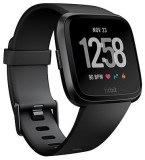
Fitbit Versa
Here Fitbit have strayed into the smart watch arena, very apparent in their blatant copying of the Apple iWatch design language.
It’s a better tracker than the Charge 2 in many ways. More tracking, more features, more everything.
The price have also of course gone up, but for what you get I think this is better value than the Charge 2. The biggest improvements is that this is swim-proof, it stores music on the watch and you can download apps for it.
It really only lacks one thing and that is a built in GPS. You can of course get that if you go for the Fitbit Ionic, but then we’re talking about a pretty substantial jump in prize.
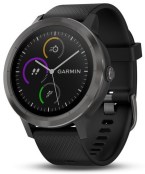
Garmin Vivoactive 3
If you know Garmin you know that these people KNOW their sports watches and bicycle computers. You might also have their GPS in your car, boat or plane.
This is another crossover fitness tracker/sports watch, similar to the Fitbit Versa. But here we have an even bigger price jump than we had with the Fitbit Ionic. But if you want to splurge I think this is a better alternative than the Ionic.
And since this is a Garmin watch you will as with the Fitbit alternatives have no problems connecting to apps and mobiles. Garmin is huge in the sports world so you won’t find that your watch is suddenly not supported.
Personally I think this looks better than all the Fitbit alternatives, so if I find it for a good price I think this might end up being my choice. It also have solidreviews, so you know you won’t go wrong with this option.
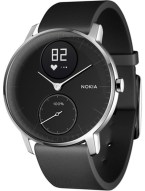
Nokia Steel HR
This is not a Nokia product. This is a Withings-product that changed name to Nokia when Nokia bought the company. Now Nokia has sold the company back to the guy that started Withings, so good knows what it will be called now. Did he get back the rights to the Withings name? Who knows?
This option is sort of a joker wild card. It is the design I like the best of all my options. People that don’t know better will think this is just an ordinary watch. Only people in the know will be wise to your heartbeat tracking antics.
This is closer to the Fitbit Charge 2 in specifications, with the added bonus that this is also swim-proof. It is also fairly close in price to that model.
I like this option and I like it a LOT. The design is vastly better than any of the others and you don’t look like a nerd as it easily disguises itself as an ordinary watch.
The only drawback I can find here which makes me hesitate a little bit is the selling back and forth of the company. Withings was a fairly good known name and it’s products was of good quality so I think it should have an OK future, but it is somewhat of an outsider.
Suunto Spartan Trainer Wrist HR
Lastly we have an option from Suunto. This is a clock that have specifications somewhere between the Fitbit Versa and Garmin Vivoactive 3. Price wise it also smacks itself between these two alternatives, depending on what version you want of the different watches.
If you’re looking at the Fitbit Versa I would advice you to take a long look at this first. From what I can see from different reviews etc this watch gives you a LOT more than the Versa. At least two reviews mention that this watch is excellentvalue for money.
When I’ve finally made my decision I will let you know what I ended up with.








 d-Fect Inc.