Tag: C++

  • Beginning C++ 93-100: Characters and Strings

    Characters and Strings… We have worked some with it so far, but just really putting the strings out there for the user to read and then reading in a single character or number.

    I guess we will learn more about what you can do with strings in this chapter. I just watched some video saying that C++ didn’t have strings, so I’m a little confused though. But I hope everything will be more apparent after watching this chapter of the course.

    blur close close up cord
    Yes, these are strings

    Lecture 93: Section Overview

    This section shows the legacy of C in C++. We will work with both C-style strings and C++-style strings and learn the difference between them

    The instructor does advise us to use C++ strings, so I guess that C++ has some aces up its sleeve when compared to the older C. The instructor hints to C++ strings being objects, so I think that’s where some of the difference lies.

    Lecture 94: Character Functions

    The header-file cctype includes several functions for working with characters. You can test characters for several properties. For instance, you can check if the character is a letter or a digit, or if it’s lowercase or uppercase.

    It also has functions for converting characters to lowercase or uppercase that are very handy.

    I’m a little bit confused about these though since I used tolower() in the last section challenge, but I did not include the cctype header. I tried googling an answer for this but was unable to find any, so I’ve asked it in the Q&A-section for the video.

    Lecture 95: C-Style Strings

    C-style strings are just an array of characters in contiguous memory that is terminated by a null character. This means that a string uses at least one memory space more than is shown on screen since the last character is used by C++ to determine where the string ends.

    This can lead to problems if you treat it like a regular array, as the termination character is a valid memory space and you won’t get any errors or warnings from the compiler if you try to change it.

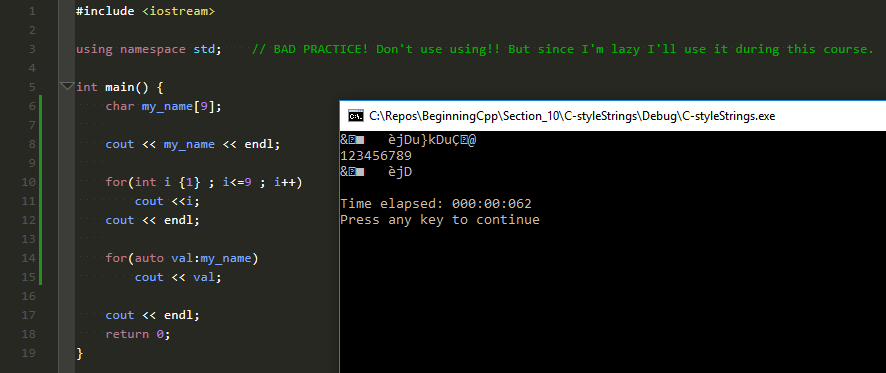
    I made a small program showing what can happen if you don’t treat strings with care. I declared a char-array with 9 spaces and printed it. I then made two for loops to write out the numbers from 1 to 9, just to make it easier to see the characters, and then I printed each character by itself, looping through the array with a range-based for loop.
    Section 11_95 - fig 1

    As you can see, the first string printed is much longer than the contents of the array, and that’s because there was no termination character inside the array. Had I been unlucky, the printout might have been much, much longer. It could also have ended on the first character. We just don’t know, as the contents of the array are undefined, precisely like Franks mentions in the video.

    All C-style string functions in the cstring and cstdlib header files expect a null termination character, so it’s easy to see that you really must know what you do when working with these kinds of strings.

    Programmers are smart, so they have known how to do this for a long time, but according to the instructor, many of these problems have been solved with C++ style strings. If you ask me, that sounds like the smarter thing, have the language take care of the behind the scenes stuff and let the programmer write code.

    Lecture 96: Working with C-Style Strings

    This video is going through examples on how you write code using C-style strings.

    The instructor starts with some code showing the same I do above, but I think my example shows it better. 😊

    But I’m not putting too much effort into this lecture, as the instructor told us to use C++ style strings mostly, so I’m waiting for that in the next part. But I guess it’s important to know this style since there’s probably a lot of code using strcpy() and strcmp() out there.

    Lecture 97: C++ Strings

    I watched a video from 2016 on YouTube that said C++ doesn’t have strings. And now I watch this video where Frank says that C++ has a large and complex string system. But maybe the first guy meant it wasn’t C++ proper since it’s in the STL. If you ask me though, it’s strange not seeing the Standard Template Library as a part of the language.

    The C++ strings are object-based, so they fit into the style of C++ with the ability to use standard operators, member functions, etc. The easiest way to describe it is that it’s similar to using arrays or vectors. Both can more or less do the same, but one way is just keeping with using the old C-functions while the other way is using modern object-oriented programming.

    That means that if you go the C++ way, your strings will behave like objects and have member functions that you use on them. When you declare a string variable, it’s always initialized for you, that means no risk of printing out garbage content to the screen if you forget to do it yourself. They are also dynamic in that they can grow and shrink in size. And maybe most important, they are safer to use. The functions use bounds checking, so less risk putting data into unknown memory space.

    All in all, I will say that the looks easier and safer to use than C-style strings.

    Lecture 98: Working with C++ Strings

    Not surprisingly, this video is the instructor going through examples of using C++ style strings.

    I must say it’s much clearer using C++ style than C-style strings. Probably because I don’t know C. But if you don’t know C, you have to agree it’s much easier to understand s1 = s2, than it is to understand strcpy(s2, s1).

    Of course, in C-style, you know that you are copying strings, while in C++ you’re really not sure what types you’re assigning to each other. But with proper variable naming, that shouldn’t be a problem.

    The instructor also shows us that other significant advantage of using the object-oriented style of C++. For instance, the functions do bounds checking for you, so you will never walk yourself out of a string using a poorly constructed loop.

    Lecture 99-100: Section Challenge, Solution, and Quiz

    A pretty cool challenge in this section. We’re essentially making a decoder ring. 😊

    When you look at it, you might think that it must be very complicated to make an encoder and decoder. But then you look at the problem, break it down into parts and realize that it’s surprisingly easy. And C++ gives you all the tools you need to solve this problem.

    All in all, the program I wrote was about 40 lines. I’m sure you can make it much shorter with some effort.

    I loved this challenge since I’m a crypto nerd. Not like in the coin stuff but like secret messages. I think I’ll need to try to implement more ciphers in C++ and the Vigenère cipher for sure is something I need to work on.

    Assignment 1: Challenge Assignment – Letter Pyramid

    In this section, the instructor has also added a new kind of challenge or assignment for us. This time we need to get a string from the user, and we will then make a letter pyramid out of that string.

    I learned that it’s important to break a problem into parts. At first, I was at a loss, but it got more manageable when I identified the three elements of the problem.

    1. Print padding
    2. Print the correct number of characters starting from the front
    3. Work back through the string from the position in 2 and print each character as you go

    Then it was just a case of solving each small task, and it went somewhat easy from there.

    It’s not the prettiest code, but it works. 🙂

    What’s cool with this is that after you submit your solution, you get to see the same problem solved by three other students in the course. I must say that the answers I saw are wildly different. That also taught me a lot, since at least one of the students solved it in a brilliant way that I didn’t even remotely think about when I worked on the problem.

    And as usual, go to GitHub for my attempt at writing some C++ code.

     

  • Beginning C++ 82-92: Controlling Program Flow, part 2

    Let’s continue our journey through controlling the program flow in C++.

    Last time it was all about evaluating an expression and doing stuff based on the result. Our four weapons to do that was the if-statement, the if-else statement, the switch-case statement, and the conditional operator. Frank also snuck in some learning about blocks, indentation, and scope.

    In this second part, we will go through different kinds of loops and end with the section challenge and quiz.

    cable rope loops
    We’re going all loopy!

    Updated 20180730:
    Updated lecture 90-92 to reflect that I’ve now done the challenge and uploaded the result to the repository.

    Lecture 82: Looping

    C++ has two or four different types of loops, depending on how you look at it. Frank says three in the course, but I’ll stick with my claim of two or four.

    The first is a for loop which iterates something X number of times. This is a very common loop, and I have already used it in some of my code examples in earlier sections.

    Then there is a variant of this, the range-based for loop, where you, for example, go through all the elements of a vector. If you remember I used a for-based loop to do this in the section about arrays and vectors. If I had known about this type, I would have used that instead. But that’s what the course is for, learning something new.

    The third one is the while loop, which has a variant in the do-while loop, so altogether four types of loops.

    The difference between the while-types is that the while loop checks a condition at the beginning, while the do-while checks at the end. This means that a while loop may never do the code inside of it, but the do-while variant will execute the code at least once.

    Lecture 83: for Loop

    22-minute video? I thought for loops were easy… This video is actually full of information, not only on how to write a simple loop.

    Of course, he shows you that, but we are also taught how to use the modulo operator for checking specific values in a loop. He talks about the conditional operator again. He speaks more on the importance of formatting your code and how, in some instances, the compiler will help you by showing you warnings. You learn about the comma operator for using multiple variables in one loop, and he also quickly mentions how to create an endless loop.

    So as you understand, this lecture is chock full of examples. Some shown on slides, but again I like that most of them are practical examples in CodeLite. It’s all pretty straightforward, but if you haven’t written code before, I really do recommend you follow along and type the examples yourself.

    There’s a neat example the instructor writes using the conditional operator we learned about just a few lectures ago. Do try to write that one yourself before you watch Frank do it. I managed to do it, but I had to think for a few minutes on how you could put an endline into a conditional operator. We have used that method before, and some of you might get it right away, but I bet some of you, like me, had to do some thinking.

    The examples also do prepare you for the exercises he has recently added to the course, so if you did the typing while following the video, you should be set to solve the code exercise easily.

    Lecture 84: range-based for Loop

    This feature was introduced in C++11, so it’s a very new function.

    It makes it very easy to go through a vector, string, array, etc. and manipulate each element as C++ iterates through the loop. And you can also use the auto keyword with the variable, making it even easier to use this.

    This loop type is really simplifying a lot of the work needed to go through a collection compared to first finding out the size, then declaring an integer to count with, comparing that int to the size we found earlier, incrementing it, etc.

    There have been some smart thinking by the C++ guys here, I must say.

    Lecture 85: while Loop

    This is the loop to use if you want to test an expression before you run the loop code. This means that sometimes the code in the body of the loop will not run even once.

    You check a condition, and if it’s true, you run the code in the body of the loop. Then the check is rerun, and you either run the code, and the cycle continues, or you end the loop.

    It’s therefore critical to change the variable you check in the loop body. If you don’t do this, you might end up with an infinite loop.

    Lecture 86: do while Loop

    You’ll use this version of the while loop if you want the code in the loop body to execute at least once. The test will be performed after the body has finished and depended on the result, you’ll rerun the loop or jump out of the loop.

    Very similar but very nice to have both options as you sometimes do want your code to run at least once and sometimes you don’t.

    The lecture ends with the instructor writing an example of how you could make a menu selection in C++. I watched his introduction, paused the video and wrote my solution before I watched the instructor do it. I really do advise you to do this. I chose another path but got the same end result. You’ll learn so much more doing it yourself first than just watching what the instructor does and then repeating it.

    A bonus for me was that I got a bug in my code, so I had to brush up on my switch statements again to find out why the program wouldn’t do what I wanted it to. Bonus repetition for me there. YEAY!!

    And DO think about why he had to use AND not OR in the test expression. My first thought was also that he should have used an OR, so when he used AND my brows kind of met in the middle for a while. But imagine that the user types an ‘a’ and do the test expression as a mental exercise. Or on paper, that works too.

    You should end up agreeing with the instructor. And if you struggle, the answer can be found on the page about operators on cplusplus.com.

    Lecture 87: continue and break

    This was a change from the previous videos since this clocks in at under 3 minutes. But why make it long and complicated, when you can make it short and sweet?

    But I really do see that these statements can be powerful tools when used in the right places. We’ve already used break in the switch-construct to terminate and jump out of the loop.

    Continue is almost the same, but instead of jumping out of the loop, it jumps back to the beginning again continuing the next iteration.

    At first, I had to think about that continue statement, as it sounds like you should use it to continue on in the program. But it got more evident when I found out that you must think of these two related to the loop you are in. You either break out of the loop and terminate it, or you continue the loop from the beginning.

    Lecture 88: Infinite Loops

    Infinite loops are just what they sound like. Loops that never ends.

    Usually, these kinds of loops are unwanted and the result of a bug or poorly designed code, but the instructor does come up with a few examples where you would want to use a loop like this. But unless you’re writing an OS or a mobile app waiting for an input, the advice is to avoid these constructs.

    Lecture 89: Nested Loops

    Now we’re back to a lengthy video again, but again it’s mostly practical examples in the IDE after the instructor first shows us some cases.

    I listened to what the instructor wanted and wrote my code before I looked at his. This means that my code is different from the instructors. His code is better designed to show nested loops of different types and the importance of proper indentation to help with readability. My source is as always viewable on my GitHub.

    This shows how easy and powerful it is to use loops. You can do a lot with just a few lines of code.

    Lecture 90-92: Section Challenge, Solution, and Quiz

    This is a whopper of a challenge. The description is 64(!) lines long.

    If you haven’t, I really advise you to download the source code for this section. That way you can have the instructions beside you while you work on your solution. You’ll find the instructor’s source code under Section 21 – Bonus Material and Source Code.

    In short, we will print a menu, and the user will select an option, invalid options should not be allowed. The other options should let the user add numbers to a list, print them and see various information about the numbers on the list.

    I streamed me working on the coding exercises and this challenge on my Twitch channel, https://twitch.tv/oldgrumpygamer. Sadly I had to remove the VOD, but it was much the same as how the instructor did it, except I used a switch statement and took four hours to do all the coding exercises and this challenge.

    I also added some code for the extra challenges in there, so I can search the list and clear it. Also added an alternate version of the add function, so you can’t add a number that’s already in the list. If you missed the stream you can find my solution on GitHub.

    I also did the quiz for this chapter on stream. Only got 8/10 right this time, I should at least have gotten 9. My tip is to read the code examples in the questions carefully. There might be a trap or two hidden there.

  • Beginning C++ 76-81: Controlling Program Flow, part 1

    I remember when I first learned to program. It was in BASIC on the good old Commodore 64. There were loads of GOTOs all over the place, and the program code was difficult to follow.

    Hopefully the functions C++ gives us is way better control and overview of the source. I suspect we will see at least some if-else statements, some for-loops, some while-loops, and even more I can’t remember right now.

    This section is even more extensive than the previous one, so I have split this section into two blog posts. That way I can push them faster to you, and they are more readable since they aren’t so long.

    If you’re interested in taking the course yourself, you can find it on Udemy.

    men working at night
    These guys looks like they have control.

    Lecture 76: Section Overview

    In the overview, we get an introduction to the three building blocks a C++ program consists of. These are sequences, selections, and iterations. With these three items, we can write any algorithm we want.

    We also get a quick review of all of the different kinds of selection- and iteration structures that exist in C++. These will be further explained in the following lectures of this section.

    Lecture 77: if Statement

    This is an 18-minute whopper of a video, but when you see it, you will understand why. In addition to introducing and explaining the if-statement, we also learn three other features of C++; blocks, indentation, and scope.

    The if-statement is a fundamental element of every program, and it merely tests if some expression validated to true and if it does, executes one or several lines of code. This is where the equality, relational and logical operators we learned about in the last chapter comes in.

    One example from real life I’m pretty sure shouldn’t need more explanation can be coded like this:

    if (traffic_light == red) 
         stop_car();

    You notice that I’ve indented the stop_car()-line. That is to make it easier for us to read the code. The C++ compiler really doesn’t care, but it makes it easier for us humans to read the code.

    But what do you do if you want to do more than one thing? That’s where blocks come in. Something it seems we have already used in this course but haven’t thought about or had a word for. A block is one or more statements encased between { and }. If you look at the previous programs you’ve written in this course, you will see that the main()-function is just such a block.

    Here’s an example of using a block with an if-statement:

    if (traffic_ligth == green && car_is_stationary == true) {
          put_car_in_gear();
          depress_gas_pedal();
     }

    One cool thing with blocks like this is that they are also what is called a scope. What this means is for example that if you declare a variable inside a block, it will only be available inside the block.

    The instructor shows all this in a practical example using four different tests conditions. I like that he writes the programs as he talks about it, even if that means we will see errors, typos, etc. I think that the lessons we learn by hearing his reasoning as he works out the program is more important than just getting to see the finished result.

    Lecture 78: if-else Statement

    This is very similar to the if-statement we saw in the last part. You just add an else-statement that will execute if the first statement is not performed. This means you can read an if-else statement as If this check validates to true the do this, else do this other thing.

    You can also expand on this with if-else-if. With several statements like those, you can do multiple checks at once.

    Again, the lecture is closed off with practical examples using CodeLite. I can’t really come up with a better case myself, so I didn’t. 😊

    Lecture 79: Nested if Statement

    You can also nest if and if-else statements within each other. You’ll probably find yourself doing this quite often, as many decisions can’t be decided by just one statement.

    But this leads to a problem, which Franks describes as the dangling else problem. In short when you have several ifs and one just else, which if-statement does the else belong to? The rules in C++ is that an else belongs to the nearest if.

    This can get very confusing, so it’s essential to use proper indentation so you can see which if belongs to which else.

    The significant part of this lecture is again Frank going through two different practical examples. I will recommend you do them together with the instructor as you will see the efficient use of the indentations.

    In the shipping calculation example, you might see a glaring omission in the input checking. I would also add a check to see if one or more of the dimensions are below 1. So I did. 😊 As usual, you can find my code for this course on GitHub.

    I’m a little sad that it doesn’t look like CodeLite is smart enough to un-indent, if that is a word, when you’re not using a code block with {}. I need to check if that can be changed somehow.

    Lecture 80: switch-case Statement

    Another 20-minute lecture. We really get our money’s worth in this section. 😊

    This selection statement is a little different as the switch statement runs a control expression and gets a specific answer that is an integer or integer literals. You then write one or more case statements, and C++ will run the one that matches the result of the switch expression.

    The syntax is very different from an if-else statement, but the instructor shows us several examples on how this works and does some live coding in CodeLite, so I feel confident I now know how this works.

    In the first example, I elected to do my checks a little different and used toupper() on the input we got from the user. That way my select statements are a bit shorter, but I guess the instructor did it the way he did as a refresher on the Boolean operators we learned about earlier. You know where to go if you want to see my code, hint GitHub.

    In the other example, Frank quickly shows us how C++ handles a switch-case statement using an enumerator. If you forget to check for all values in an enumerator and don’t include a default, the compiler will give you a warning about this. That’s a pretty neat feature, as you will then know if you have handled all the different possibilities or not.

    Lecture 81: Conditional Operator

    ?:
    No, it’s not a malformed question lacking any words, that is the conditional operator in C++.

    I’ve seen that in many C++ programs and never understood how it worked. It should be said I didn’t work hard to understand it either, nor did I do a Google search, but it does look a little bewildering.

    Luckily it isn’t, and this 10-minute video is all it takes to get to grips with it.

    It is very similar to an if-else statement and goes like this:

    (expression to be evaluated)?(return this if true):(return this if false);

    The instructor shows us several slides on how this works and also goes through a practical example in CodeLite. So, in the end, you should have a good grasp on this strange, little operator.

    End thoughts

    I will do this section in two parts since it is another long one, but before I go, I just have one more thing to say.

    When the instructor is doing his practical examples in CodeLite, listen to him, hear him out to see what he will show you and then pause the video and try to do it yourself first. You will learn SO much more by doing that.

    You might not solve it, you might do it in a completely different way or maybe precisely as Frank does it. Either way, you have learned more coding by just trying it yourself first.

    Next time I’ll complete this section and do all lectures on looping, the challenge, and the section quiz.

  • Beginning C++ 53-61: Arrays and Vectors

    Arrays and Vectors?? I know that an array is like a collection of values. I also know that vectors are used for describing direction and speed in maths. I don’t think that’s the same here.

    Well, time to learn some new concepts of the C++ programming language.

    If you’re interested in taking the course yourself, you can find it on Udemy.

    alternative alternative energy blue eco
    This is not the array you’re looking for…

    Lecture 53: Section Overview

    So just a brief overview of the section again.

    Arrays and vectors are compound data types. That is datatypes that are made up of other data types. Vectors are the way to go in modern C++ and the course will dive deeper into this later.

    Lecture 54: What is an Array?

    As mentioned in the overview, an array is a collection of elements of the same data type.

    This means you can for instance make an array of strings, call the array Names and use this to address all the names. You can then go through the list, read each name and then put it into some output. Much better than using say 100 different variables called name_1, name_2 etc.

    But arrays also have some limitations. One is that it’s a fixed size. If you define it to have space for 100 names and you need to add name 101, then you’re out of luck and need to change the program.

    You also need to keep track of how many elements the array has yourself. If you have 100 elements, but ask to read element 123, the program will read some data from memory and spit it back at you, but it probably won’t be useful.

    The worse thing is that you can also change elements that are out of bounds. That means you will write data into memory that might be used by other programs and have the potential to crash the computer.

    But an array is very efficient and easy to loop through, so it’s a nice tool to have. Just remember that the first element in the list has address 0, not 1. So an array with size of 100, goes from 0-99. If you go from 1-100, you can and probably will end up in trouble.

    Lecture 55: Declaring and Initializing Arrays

    Here we go through how to declare an array.

    It’s pretty easy and straightforward. Just remember you have to set it’s type and size when declaring it. As always it’s good practice to initialize a list when you declare it.

    Actually, as it turns out,  I lie. Just goes to show that a little knowledge can be dangerous. 🙂
    If you provide a list of values you can omit setting the size and the compiler will set the size based on the number of elements in the list you provide.

    Lecture 56: Accessing and Modifying Array Elements

    Here we learn how to access the individual elements of the array to get the value of that element. The instructor goes through how this works in the background and what the compiler does. He then shows you practical examples in CodeLite and also shows how you can easily crash your program.

    It’s explained clearly and it’s pretty easy so shouldn’t give you any problems. Just remember that the compiler does NOT check that you are keeping yourself inside the array.

    Lecture 57: Multidimensional Arrays

    Sometimes you need more dimensions and C++ supports this. You declare, initialize and use it in the same way as normal arrays by using [] and {}.

    Really nothing special about this, you just introduce more dimensions into the array.

    pexels-photo-285174.jpeg
    That is some nice vectors. 🙂

    Lecture 58: Declaring and Initializing Vectors

    A vector is defined in the C++ Standard Template Library. It has many of the same characteristics as arrays, but with added bonus features. Since it’s part of the library it already has built-in functions that you can use in your code. This can be things like sorting, finding an element and more.

    I’m really looking forward to learning more about the STL as that has been lacking in the other courses I have taken. And there’s a whopper of a section on STL later in this course. It’s 28 lectures long, so it’s longer than many full courses on Udemy. 🙂

    Vectors can be defined as a dynamic array, where the size can grow or shrink as needed. This is much better than arrays as you are using the exact memory needed to hold the data. With arrays, you had to declare the size up front, so you could up end up wasting memory or find yourself going outside the array with unknown consequences.

    After seeing the summary in this lecture I really understand why Frank earlier said that you mostly use vectors in modern C++. They just seem better in every which way.

    Lecture 59: Accessing and Modifying Vector Elements

    Again we see that arrays and vectors are much alike, as you can use the exact same syntax as with arrays. But then you also have the same limitations, for instance, the possibility to go outside the vector.

    And here we get to see the object-oriented part of C++. Vectors have several methods of accessing and modifying it. We also see that if you try to modify something outside the scope of the vector using these methods, the program will now crash with an error message instead of doing something potentially dangerous to your computer.

    The error message you get can be pretty daunting, but the instructor explains it in a clear way, showing you what to look for. And that is pretty important. Some people panic when they see an error message because it can be just too much information. Getting shown what to look for is invaluable.

    The instructor again uses practical examples in CodeLite to explain and sell vectors over arrays. I now understand even clearer why vectors come with huge benefits over arrays.

    Lecture 60: Section Challenge and Quiz

    The challenge was again pretty straightforward. The instructor asked us to create 2 vectors, add some data to them and then print them out. We were then going to create a 2D vector and add the first two vectors to that and display the content. Again pretty easy.

    But now comes the surprise. Frank asks us to change the first element in the first vector we created and then display the content of the 2D vector again. I thought that we might get a change of value in the 2D vector, but we didn’t. The content was still the same.

    That’s because when we added the element, we copied the content from the first vector into the 2D vector. So when we changed the first vector, the copy did not change. Interesting and pretty important to know, so was nice to see how it works in practice.

    Later we will learn about vectors of references and pointers, which will behave differently and where we can do what I thought was going to happen.

    My solution was pretty close to the instructors. After all, it was pretty straightforward and not terribly advanced. I did throw in some for-loops when I was displaying the data though, just to see if I remember how to do them.

    I also did some experimentation with the size()-method on the 2D-vector to find out how you find the sizes of the internal elements. It worked out to be pretty easy. So that’s why my vector1 contains three elements instead of just 2.

    And it worked 🙂

    As always all my trial code and challenge solution can be found on my GitHub.

    The quiz this time was a little more complex and I had to think more. I almost failed one, but with a little bit more thinking I saved my honor and got a 10 out of 10 score. 🙂 But again I miss a little more feedback than just “Good job!” when you answer correctly.


  • Beginning C++ 36-42: Structure

    This section teaches us the structures of a C++ program. C++ being a static language imposes some pretty strict rules on what you can do and not, so learning how a program is structured is pretty important.

    These early videos don’t really do much coding, so there’s not really much to do for me here other than summarize them. Hopefully, there will be more coding later where I can show you my solution and my thoughts behind it.

    architecture-iron-steel-building-53176.jpeg
    The structure of a C++ program is very important.

    Lecture 36: Section Overview

    Again the section starts with a quick overview of what we will go through in later videos. Always nice to have some knowledge of what you are going to learn before you get the details.

    Lecture 37: Overview of the Structure of a C++ Program

    This lecture starts by showing us the keywords of C++. It has over 90(!) defined keywords, which is much more than many other languages. Luckily many of them are not used so you don’t have to remember all 90.

    Then the video goes on to talk about identifiers and what’s the difference between them. It also gives you a quick overview of operators and points out some specific C++-operators. Lastly, we go into punctuation and show some examples of that.

    All of these elements put together gives us the syntax of C++.

    Lecture 38: #include Preprocessor Directive

    Here the instructor gives us a brief overview of what the preprocessor is and what it does.

    It’s a program that goes through the code before the compiler gets hold of it. It doesn’t do anything with the C++ code, nor does it understand it. It just goes through the source code, does some finessing with it and then spits it out and into the compiler.

    Lecture 39: Comments

    // This is a one-line comment.

    /* These lines of code
    are comments that go
    of several lines, aka. a multi-line comment. */

    I saw somewhere else that comments using // was the C++ style code, while /* */ was C-style. Don’t know if anyone can confirm or deny that?

    Comments should just be used to explain complicated code. Clear to understand and obvious code doesn’t need comments.

    The course also discourages the use of comments for version control. It’s much better to use Git, Subversion or other systems to get real version control of the source code.

    BTW, one of the jobs of the preprocessor is to strip the source code of comments so the compiler doesn’t have to bother with them.

    food-plate-restaurant-eating.jpg
    This main() course looks SOOOO good! 🙂

    Lecture 40: The main() function

    Now we’re coming to the main() course.  😀

    The main()-function is an important part of a C++ program as each program must have one, and only one, main() function. This is where the program starts its execution, so whatever your program does, it all starts here. Most of the code is actually not in the main() function at all, but without it the program won’t do anything.

    The course describes two different versions of main, depending on if the program accepts command line arguments or not, int main() or int main(int argc, char* argv[]).

    In another course I take I see them using void main(…). After watching this lecture I wanted to find out why they do it differently, and the answer is that one does it right and the other one doesn’t.

    The correct way to do it is to use int main(…). The using of void main(…) is something that Microsoft Visual Studio allows, but it is just wrong and should not be done. Trying it with g++, as is the compiler used in this course, will give you an error message.

    Lecture 41: Namespaces

    Namespaces are a way to avoid conflicts between different libraries or frameworks that might have functions with the same name. Using namespaces and the scope resolution operator (::), will avoid using the wrong function.

    C++ has a “standard” namespace called std. Those three letters plus the two ::’s are something you will learn to type a lot.

    You can use a directive to avoid typing the namespace names all the time, but it comes with some dangers. This is fine for small programs, but large and complex programs should avoid this to make sure you don’t use the wrong function due to a naming conflict.

    Lecture 42: Basic Input and Output (I/O) using cin and cout

    Most of the other videos in this section has been around the 3- to 4-minute mark, but this video comes in at a whopping 20+ minutes. Time to prepare for a HUGE chunk of info.

    We learn about cin, cout, cerr and clog and more from iostream. This is really the first course I’ve taken that mentions cerr and clog. Probably because it’s mostly not used, but again this is a nice touch and shows that this course goes deeper than most.

    Another nice point is that Frank, the instructor, talks about the difference between using \n and using endl when adding a line break. For the user, it looks the same, as the end result is that the next text that is written goes to the next line, but behind the scenes, there is a difference. Especially when working with files you will want to be aware of the difference.

    The instructor also goes quickly through the pitfalls of using cin for reading inputs.

    The lecture ends with examples of everything that’s talked about and again Frank does a pretty good job of explaining what happens and why you need to be careful when using cin. He actually says that usually, you don’t use cin to get user input without going into further explanation. I guess we will come back to that later.

    Quiz 2: Section 5 Quiz

    So no Section Challenge this section, but a nice little quiz. We didn’t really learn any new statements etc in this section, so a challenge would really just be a repeat of what we’ve already done in earlier sections.

    The instructor sneaks some nice little traps into this quiz, so it’s important to read the questions and answer alternatives thoroughly before selecting your answer. I didn’t so I ended up with just 9 out of 10 correct on the first try. Was pretty easy to figure where I went wrong, but a nice touch from the course so you just don’t cruise through these.