Let me first say that the project of getting my body into summer shape is not going the way I planned. As you will see from my body stats, it’s all bad.
I know what I need to do to overcome this hurdle, but I suck at doing it. Luckily, I have some plans.
Measuring ALL the things!
Did I get enough exercise?
Short answer; No!
I’m fond of tables, and this is really quick to make, so here’s my grand total of exercises done this month.
Date
Time
Activity
June 6th
1:45:43
Mowing the lawn
June 10th
1:15:32
Orienteering
June 19th
1:30.53
Mowing the lawn
June 26th
32:05
Walking
So a grand total of 4 exercises are what my watch have picked up, and two of them are chores and not really exercise related. I must say though that I consider mowing the lawn a proper workout. It gets my heart going, and it takes a while. Usually, the time would be closer to 1 hour though, but the summer we’ve had in Norway this year has been extraordinary which leads to unusual patterns in gardening.
I have one week left of vacation now, and I plan to start getting that 30-minute walk in when I haven’t done any other workouts. I know I waste at least 30 minutes a day doing something stupid, so let me try to do something smart instead with that time.
Did I get enough sleep?
Short answer; No!
As you can see from this graph, I get an average of about 6 hours of sleep every night. And that is not good, especially when you know that I have had vacation the last two weeks of June. I really need to get at least 7.5 hours, and maybe even 0.5 to 1 hour more on vacation.
It’s also not right that I have some peaks up to about 10 hours. It just shows that my body needs a lot more rest and sometimes it just crashes to try to cope.
What this graph probably also doesn’t pick up is that when I sit myself down to watch a movie or something, I more often than not quickly fall asleep for about an hour.
Slacking? Snacking? It’s all the same.
I’ve been slacking, and I don’t know why. It’s summer, and there are fruits everywhere. Why do I continue to eat chocolate??
At least I have now almost managed only to eat it on weekends, but my will still break from time to time. Hopefully, I will get better with this.
I’m trying to find a course to learn some techniques that will allow me to control my unhealthy urges better. If you have any tips about this, then please write in the comments below.
The grim reality
So, let me just put up the same list I gave in mid-May and see where we’re at.
Measurement
Imperial
Metric
Comment
Height
5 feet 10 inches
177cm
This probably won’t change much 😊
Weight
234lbs
106,1kg
+1.3kg / 3 lbs
Waist
46.85 inches
119cm
+3cm / 1 inch
BMI
33,9
+0.4
Fat percentage
33.7
+0.2
Red across the board there, so not very uplifting results when you just look at them like this and compare to last month. But you can’t really do that. You should always consider an extended period of time and try to remember if something unusual happened during that period.
I was ill for several weeks this winter and lost most of the weight during that period. And we all know that weight you lose when you are sick always comes back. I’ve only gained 3kg over a period of 2 months since I got well again, so I’m happy with that.
I was at my doctor in June, and she was delighted with what I have done.
And if you look back longer, I’m thrilled. Last September I was 117.5kg, so I’ve lost more than 10kgs since then. I just need to stop my slow upwards creep before it’s all back again, but hopefully, this blog and my new focus on this will help me with that.
If you are using Skype for Business, possibly also standard Skype, you might appreciate the fact that it reduces the volume of other apps like Spotify etc. when there’s an incoming or outgoing call.
A problem I have with Windows 10 is that the sound is reduced, but when the call is over the volume is not reset correctly. I’ve found that I can go to the volume mixer and adjust the volume of the muted application, but often when I then change the overall sound volume, the apps volume is reduced again.
Luckily there’s a solution. While not perfect, it stops the annoyance of Skype not unmuting sound properly.
OK, this is probably worse than Skype, but it doesn’t mess up your PC sound settings.
What you need to do is the following.
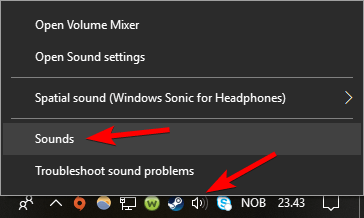
Right-click the Speaker symbol in the system tray and select Sounds from the menu that pops up.
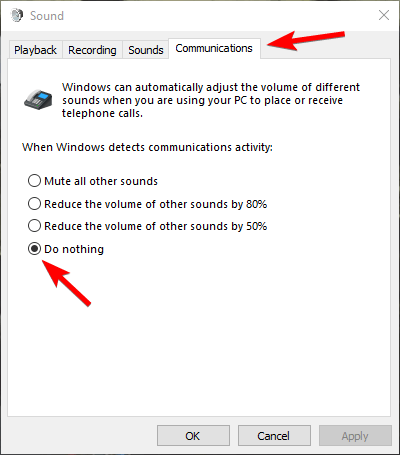
Select the Communications tab in the Sound window that pops up, select Do nothing from the alternatives and click OK.
Skype and other programs that Windows 10 recognizes as a communications activity will no longer mess with the sounds of running applications.
I do use computers a lot, and I actually work with IT support, so you might see tips like this from time to time. Especially on problems, I find annoying and where I don’t find many articles already on the net about the issue. Please give feedback if you want more or less of them.
Arrays and Vectors?? I know that an array is like a collection of values. I also know that vectors are used for describing direction and speed in maths. I don’t think that’s the same here.
Well, time to learn some new concepts of the C++ programming language.
If you’re interested in taking the course yourself, you can find it on Udemy.
This is not the array you’re looking for…
Lecture 53: Section Overview
So just a brief overview of the section again.
Arrays and vectors are compound data types. That is datatypes that are made up of other data types. Vectors are the way to go in modern C++ and the course will dive deeper into this later.
Lecture 54: What is an Array?
As mentioned in the overview, an array is a collection of elements of the same data type.
This means you can for instance make an array of strings, call the array Names and use this to address all the names. You can then go through the list, read each name and then put it into some output. Much better than using say 100 different variables called name_1, name_2 etc.
But arrays also have some limitations. One is that it’s a fixed size. If you define it to have space for 100 names and you need to add name 101, then you’re out of luck and need to change the program.
You also need to keep track of how many elements the array has yourself. If you have 100 elements, but ask to read element 123, the program will read some data from memory and spit it back at you, but it probably won’t be useful.
The worse thing is that you can also change elements that are out of bounds. That means you will write data into memory that might be used by other programs and have the potential to crash the computer.
But an array is very efficient and easy to loop through, so it’s a nice tool to have. Just remember that the first element in the list has address 0, not 1. So an array with size of 100, goes from 0-99. If you go from 1-100, you can and probably will end up in trouble.
Lecture 55: Declaring and Initializing Arrays
Here we go through how to declare an array.
It’s pretty easy and straightforward. Just remember you have to set it’s type and size when declaring it. As always it’s good practice to initialize a list when you declare it.
Actually, as it turns out, I lie. Just goes to show that a little knowledge can be dangerous. 🙂
If you provide a list of values you can omit setting the size and the compiler will set the size based on the number of elements in the list you provide.
Lecture 56: Accessing and Modifying Array Elements
Here we learn how to access the individual elements of the array to get the value of that element. The instructor goes through how this works in the background and what the compiler does. He then shows you practical examples in CodeLite and also shows how you can easily crash your program.
It’s explained clearly and it’s pretty easy so shouldn’t give you any problems. Just remember that the compiler does NOT check that you are keeping yourself inside the array.
Lecture 57: Multidimensional Arrays
Sometimes you need more dimensions and C++ supports this. You declare, initialize and use it in the same way as normal arrays by using [] and {}.
Really nothing special about this, you just introduce more dimensions into the array.
That is some nice vectors. 🙂
Lecture 58: Declaring and Initializing Vectors
A vector is defined in the C++ Standard Template Library. It has many of the same characteristics as arrays, but with added bonus features. Since it’s part of the library it already has built-in functions that you can use in your code. This can be things like sorting, finding an element and more.
I’m really looking forward to learning more about the STL as that has been lacking in the other courses I have taken. And there’s a whopper of a section on STL later in this course. It’s 28 lectures long, so it’s longer than many full courses on Udemy. 🙂
Vectors can be defined as a dynamic array, where the size can grow or shrink as needed. This is much better than arrays as you are using the exact memory needed to hold the data. With arrays, you had to declare the size up front, so you could up end up wasting memory or find yourself going outside the array with unknown consequences.
After seeing the summary in this lecture I really understand why Frank earlier said that you mostly use vectors in modern C++. They just seem better in every which way.
Lecture 59: Accessing and Modifying Vector Elements
Again we see that arrays and vectors are much alike, as you can use the exact same syntax as with arrays. But then you also have the same limitations, for instance, the possibility to go outside the vector.
And here we get to see the object-oriented part of C++. Vectors have several methods of accessing and modifying it. We also see that if you try to modify something outside the scope of the vector using these methods, the program will now crash with an error message instead of doing something potentially dangerous to your computer.
The error message you get can be pretty daunting, but the instructor explains it in a clear way, showing you what to look for. And that is pretty important. Some people panic when they see an error message because it can be just too much information. Getting shown what to look for is invaluable.
The instructor again uses practical examples in CodeLite to explain and sell vectors over arrays. I now understand even clearer why vectors come with huge benefits over arrays.
Lecture 60: Section Challenge and Quiz
The challenge was again pretty straightforward. The instructor asked us to create 2 vectors, add some data to them and then print them out. We were then going to create a 2D vector and add the first two vectors to that and display the content. Again pretty easy.
But now comes the surprise. Frank asks us to change the first element in the first vector we created and then display the content of the 2D vector again. I thought that we might get a change of value in the 2D vector, but we didn’t. The content was still the same.
That’s because when we added the element, we copied the content from the first vector into the 2D vector. So when we changed the first vector, the copy did not change. Interesting and pretty important to know, so was nice to see how it works in practice.
Later we will learn about vectors of references and pointers, which will behave differently and where we can do what I thought was going to happen.
My solution was pretty close to the instructors. After all, it was pretty straightforward and not terribly advanced. I did throw in some for-loops when I was displaying the data though, just to see if I remember how to do them.
I also did some experimentation with the size()-method on the 2D-vector to find out how you find the sizes of the internal elements. It worked out to be pretty easy. So that’s why my vector1 contains three elements instead of just 2.
And it worked 🙂
As always all my trial code and challenge solution can be found on my GitHub.
The quiz this time was a little more complex and I had to think more. I almost failed one, but with a little bit more thinking I saved my honor and got a 10 out of 10 score. 🙂 But again I miss a little more feedback than just “Good job!” when you answer correctly.
So this time we have come to variables and constants. Probably some of the most important things in any software as you need somewhere to store the input and data your program uses.
This post is a long one, but hang in there and let’s see where this section leads us.
The course can as always be found on Udemy. I just realised I have forgotten to link it before. 🙂
Holy variables declarations, Batman!!!
Lecture 43: Section Overview
Yeah, well. Again a quick overview of the section.
I like these overviews because then I have some idea of what we’ll learn and expect from the section, and I don’t go in “totally blind”.
Lecture 44: What is a variable?
A nice little overview of what a variable is, what it does and how it is used.
This might seem like a general overview of variables in general programming, but it’s important to remember that this course goes through how variables are used in C++. C++ is a static programming language which simplified means that you have to declare both the variable AND the type before using it. The instructor does mention this, but it’s easy to miss.
Other programming languages have completely different rules about variables. Just because of the description, I personally have a fondness for duck typed languages. Those languages find out what kind of a variable it is, using the idea of If it walks like a duck. I’m not saying it’s better or worse, I just like the name. 🙂
Lecture 45: Declaring and Initializing Variables
This lecture goes through the rules for declaring, naming and initializing a variable and I think this is the second time the instructor goes into best practices in programming. This is something that I personally am very interested in and I’m keeping my eye out for more of this.
BTW, the first time he talked best practices was when he talked about the using directive. Go back in the course and review it if you don’t remember what he said about it, but in short: Don’t use it! 🙂 And that’s why I use it in my code during this course. 😀
The naming rules are pretty straight forward but it’s also very important to know these rules or you might end up in trouble. For instance it’s easy to think that the names Foo and foo are the same variable, but in C++ they are not.
A standard for naming things you use in C++ is important if you want to make your code clear and readable. The instructor goes through some examples, but there are many style guides out there and if you start working as a programmer somewhere, that company should have a style guide that you need to follow. Google for instance have published their C++ Style Guide on GitHub.
It might be interesting to read through some style guides when you get proficient in C++ and find one you like, but I might hold off on that until I know more C++. I skimmed through Google’s guide, and much of it was confusing as they talked about stuff I don’t know anything about yet.
The lecture ends with some practical examples on how these things work, so start up your CodeLite IDE and play around with what you’ve learned.
I think that the most important thing to remember from this lecture at this moment in the course is that you have to initialize your variable to avoid unexpected results. The compiler helps you with this as it throws up warnings if you’ve forgotten to do this, so check the errors and warnings when you compile your program.
Is she pointing at a global variable?
Lecture 46: Global Variables
Pretty short and sweet lecture that discuss the difference between local and global variables. Pretty important to know the difference, as it has some consequences and pitfalls.
The punchline is to use local variables and global only when absolutely needed. Which is pretty seldom, as I’m sure we’ll learn how to pass values between functions pretty soon.
Lecture 47: C++ Built-in Primitive Types
The lecture goes into the fundamental data types that are built into C++. The fun thing in C++ is that there are some differences between the sizes of these types depending on what system you are on.
The instructor goes into all the four main data types and shows tables describing all the intricacies, which is really not that intricate but there are some things you need to be aware of, for instance when doing math.
The last half is a practical demo of the different types using CodeLite and some C++ code. There are some pitfalls you can get into, but if you’re being smart when initializing your variables the compiler will help you by throwing errors or warnings at you.
Lecture 48: What is the Size of a Variable (sizeof)
Remember I told you that the sizes of a data type varies in C++. Happily C++ has a built in operator for showing you the size, naturally called sizeof.
But when other courses only tell you about sizeof, Frank goes into where this operator gets its values from and how you can use those include-files in your own code. If you want to, you can check out my code with some examples. Go get the code on GitHub.
Lecture 49: What is a Constant?
A constant is almost the same as a variable, but their value is constant. Well, duh… 🙂
The instructor goes into why you would use constants instead of variables with some examples. Since C++ also have different types of constants, he shows us some examples of literal, declared and defined constants.
Be aware that in modern C++ you should NOT use defined constants. The replacing of defined constants are done by the preprocessor and since that is pretty dumb and don’t have the error checking capability of the compiler it can lead to errors that might not be easy to spot.
Lecture 50: Declaring and Using Constants
This is a loooong video, but happily it’s a practical example of using constants so nothing to worry about.
The code starts really easy with just one variable and several literal constants. Then he refactors the code to make it easier to read and update. You see the instructor create and run all the code as he writes it, errors and all. I find that to be a nice touch, as the also teaches you things and makes the instructor “more human”.
This section also introduces pseudocode as a way to start your programs. Solve the problem using natural language statements first and then you translate that to C++ code later. It makes it easier to think about the problem and how to solve it than doing it directly in code.
Now it’s time for a challenge
Lecture 51: Section Challenge and Quiz
So, the challenge. This is based on the previous lecture, just a little expanded.
You are running a carpet cleaning service and this program should calculate and give a price estimate to customers. The customers provide the number of small and large rooms and then the program spits out the cost, the tax and total estimate and how long it’s valid.
Pretty easy and straightforward, but a nice little review of what you learned through the section. My solution was a little different than the instructors, but both of them works quite nicely. I use some extra variables in there, so I don’t have to do the same calculation several places. Saves some typing and time.
The quiz is a nice little recap of what the instructor has told us earlier. You have all the info, but I think he only mentioned some of it once, so you need to pay attention to the lectures.
As much as I like the “Good job!” when you answer correctly, I would like some more feedback even when you answer correctly. It might be that you just had a lucky guess and don’t really know why the answer you gave is correct.
The solution and the rest of my code from this section can be found on my GitHub page.
This section teaches us the structures of a C++ program. C++ being a static language imposes some pretty strict rules on what you can do and not, so learning how a program is structured is pretty important.
These early videos don’t really do much coding, so there’s not really much to do for me here other than summarize them. Hopefully, there will be more coding later where I can show you my solution and my thoughts behind it.
The structure of a C++ program is very important.
Lecture 36: Section Overview
Again the section starts with a quick overview of what we will go through in later videos. Always nice to have some knowledge of what you are going to learn before you get the details.
Lecture 37: Overview of the Structure of a C++ Program
This lecture starts by showing us the keywords of C++. It has over 90(!) defined keywords, which is much more than many other languages. Luckily many of them are not used so you don’t have to remember all 90.
Then the video goes on to talk about identifiers and what’s the difference between them. It also gives you a quick overview of operators and points out some specific C++-operators. Lastly, we go into punctuation and show some examples of that.
All of these elements put together gives us the syntax of C++.
Lecture 38: #include Preprocessor Directive
Here the instructor gives us a brief overview of what the preprocessor is and what it does.
It’s a program that goes through the code before the compiler gets hold of it. It doesn’t do anything with the C++ code, nor does it understand it. It just goes through the source code, does some finessing with it and then spits it out and into the compiler.
Lecture 39: Comments
// This is a one-line comment.
/* These lines of code
are comments that go
of several lines, aka. a multi-line comment. */
I saw somewhere else that comments using // was the C++ style code, while /* */ was C-style. Don’t know if anyone can confirm or deny that?
Comments should just be used to explain complicated code. Clear to understand and obvious code doesn’t need comments.
The course also discourages the use of comments for version control. It’s much better to use Git, Subversion or other systems to get real version control of the source code.
BTW, one of the jobs of the preprocessor is to strip the source code of comments so the compiler doesn’t have to bother with them.
This main() course looks SOOOO good! 🙂
Lecture 40: The main() function
Now we’re coming to the main() course. 😀
The main()-function is an important part of a C++ program as each program must have one, and only one, main() function. This is where the program starts its execution, so whatever your program does, it all starts here. Most of the code is actually not in the main() function at all, but without it the program won’t do anything.
The course describes two different versions of main, depending on if the program accepts command line arguments or not, int main() or int main(int argc, char* argv[]).
In another course I take I see them using void main(…). After watching this lecture I wanted to find out why they do it differently, and the answer is that one does it right and the other one doesn’t.
The correct way to do it is to use int main(…). The using of void main(…) is something that Microsoft Visual Studio allows, but it is just wrong and should not be done. Trying it with g++, as is the compiler used in this course, will give you an error message.
Lecture 41: Namespaces
Namespaces are a way to avoid conflicts between different libraries or frameworks that might have functions with the same name. Using namespaces and the scope resolution operator (::), will avoid using the wrong function.
C++ has a “standard” namespace called std. Those three letters plus the two ::’s are something you will learn to type a lot.
You can use a directive to avoid typing the namespace names all the time, but it comes with some dangers. This is fine for small programs, but large and complex programs should avoid this to make sure you don’t use the wrong function due to a naming conflict.
Lecture 42: Basic Input and Output (I/O) using cin and cout
Most of the other videos in this section has been around the 3- to 4-minute mark, but this video comes in at a whopping 20+ minutes. Time to prepare for a HUGE chunk of info.
We learn about cin, cout, cerr and clog and more from iostream. This is really the first course I’ve taken that mentions cerr and clog. Probably because it’s mostly not used, but again this is a nice touch and shows that this course goes deeper than most.
Another nice point is that Frank, the instructor, talks about the difference between using \n and using endl when adding a line break. For the user, it looks the same, as the end result is that the next text that is written goes to the next line, but behind the scenes, there is a difference. Especially when working with files you will want to be aware of the difference.
The instructor also goes quickly through the pitfalls of using cin for reading inputs.
The lecture ends with examples of everything that’s talked about and again Frank does a pretty good job of explaining what happens and why you need to be careful when using cin. He actually says that usually, you don’t use cin to get user input without going into further explanation. I guess we will come back to that later.
Quiz 2: Section 5 Quiz
So no Section Challenge this section, but a nice little quiz. We didn’t really learn any new statements etc in this section, so a challenge would really just be a repeat of what we’ve already done in earlier sections.
The instructor sneaks some nice little traps into this quiz, so it’s important to read the questions and answer alternatives thoroughly before selecting your answer. I didn’t so I ended up with just 9 out of 10 correct on the first try. Was pretty easy to figure where I went wrong, but a nice touch from the course so you just don’t cruise through these.

![XuY1Drm[1]](https://d-fect.net/wp-content/uploads/2018/07/xuy1drm1.png?w=864&h=504)







 d-Fect Inc.